> For the complete documentation index, see [llms.txt](https://docs.optis.me/llms.txt). Markdown versions of documentation pages are available by appending `.md` to page URLs; this page is available as [Markdown](https://docs.optis.me/swatch/variant-display/option-and-value-descriptions.md).

# Option and value descriptions

✨Demo product: [Option description](https://optis-color-swatch-variant.myshopify.com/products/nordic-dining-table-description-for-option?_pos=1&_psq=desc&_psid=38a503945&_ss=e) (password: 1)

Show extra details about an option or a specific value — pulled straight from a **Shopify metafield** — instead of leaving shoppers to guess what "Merino wool" or a color name means. Configure it from **Configure Variants → Description config**.

## Two levels

<table><thead><tr><th width="160">Level</th><th>Metafield owner</th><th>Use for</th></tr></thead><tbody><tr><td><strong>Option-level</strong></td><td>Product metafield</td><td>A description that applies to the whole option (e.g. a sizing note for "Size")</td></tr><tr><td><strong>Value-level</strong></td><td>Variant metafield</td><td>A description specific to one value (e.g. fabric details for "Merino wool")</td></tr></tbody></table>

For each level, pick the **metafield** to pull the description from, then choose where it displays:

* **Below name**
* **Beside name**
* **Below option**
* **Tooltip** (on hover)
* **Popup** (on click)

## Supported metafield content

The description renders differently depending on the metafield's type:

<table><thead><tr><th width="140">Metafield type</th><th>How it renders</th></tr></thead><tbody><tr><td>Plain text</td><td>Shown as-is</td></tr><tr><td>Color (hex)</td><td>Rendered as a color swatch</td></tr><tr><td>Image</td><td>Shown as an image</td></tr><tr><td>Video</td><td>Shown as an inline video player</td></tr><tr><td>Measurement</td><td>Formatted as "&#x3C;value> &#x3C;unit>" (e.g. "42 cm")</td></tr><tr><td>Rating</td><td>Formatted as "&#x3C;value>/&#x3C;scale>" (e.g. "4/5")</td></tr><tr><td>Money</td><td>Formatted as "&#x3C;amount> &#x3C;currency>" (e.g. "12 USD")</td></tr></tbody></table>

{% hint style="warning" %}
The app only **picks** an existing metafield — it can't create one. You must create the metafield definition (and fill in its value on each product/variant) in **Shopify admin** first.
{% endhint %}

## How to set it up

### Step 1: Create the metafield in Shopify admin

Create one definition for each level you plan to use — they live under different owner types, so set them up separately.

{% stepper %}
{% step %}

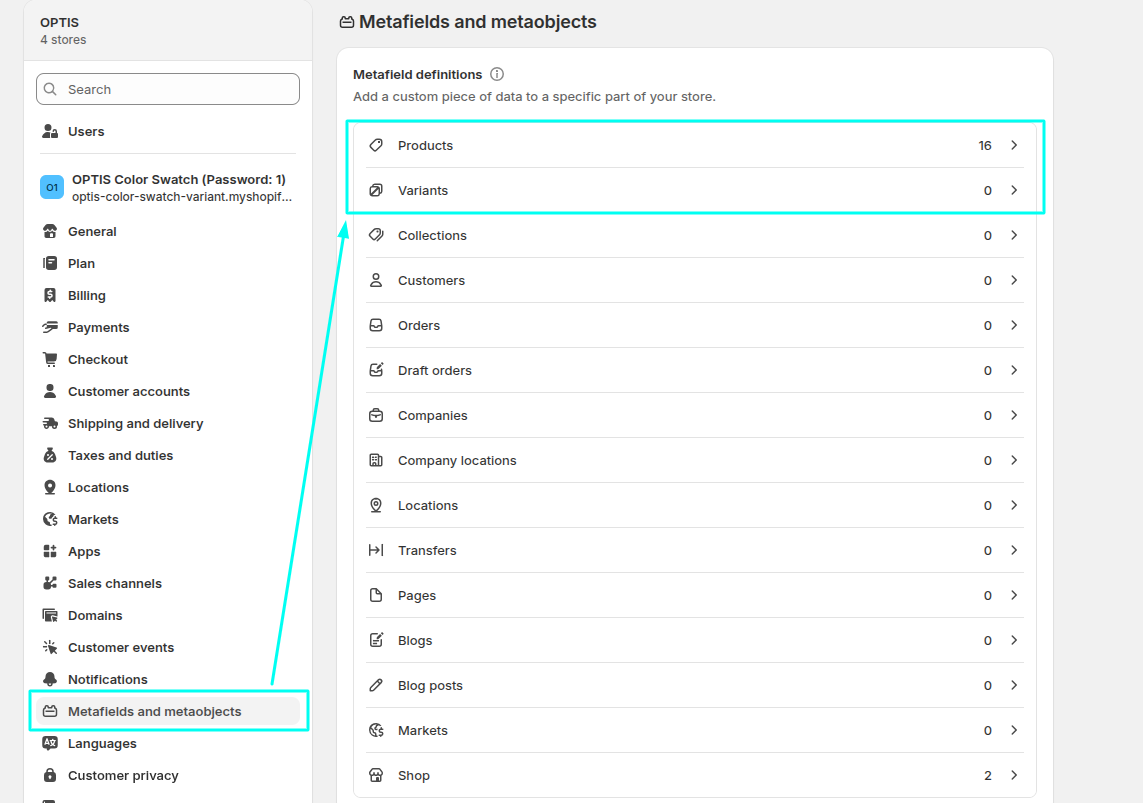
#### Go to Shopify admin → **Settings → Custom data**

<figure><img src="https://4026661835-files.gitbook.io/~/files/v0/b/gitbook-x-prod.appspot.com/o/spaces%2F50cmOdvfYj3qqQaTzKEI%2Fuploads%2Fgit-blob-9e69484c86ae84d00b64dc66d4632920332f6709%2Fimage.png?alt=media" alt=""><figcaption></figcaption></figure>
{% endstep %}

{% step %}

#### Pick the owner type for the level you're setting up

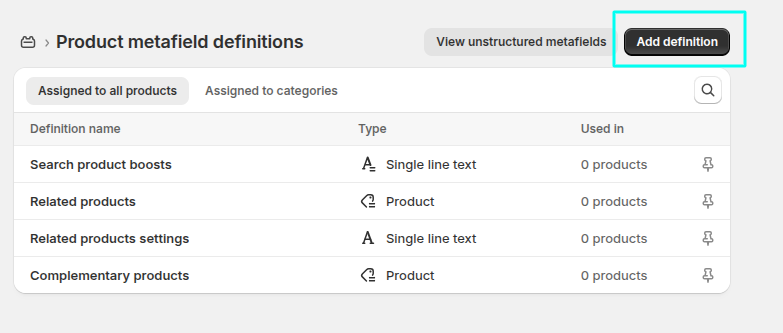
* **Option-level** description → click **Products** → **Add definition**

<figure><img src="https://4026661835-files.gitbook.io/~/files/v0/b/gitbook-x-prod.appspot.com/o/spaces%2F50cmOdvfYj3qqQaTzKEI%2Fuploads%2Fgit-blob-c1beb240f17f5438dc38b8dbf24b03c85dad3b38%2Fimage.png?alt=media" alt=""><figcaption></figcaption></figure>

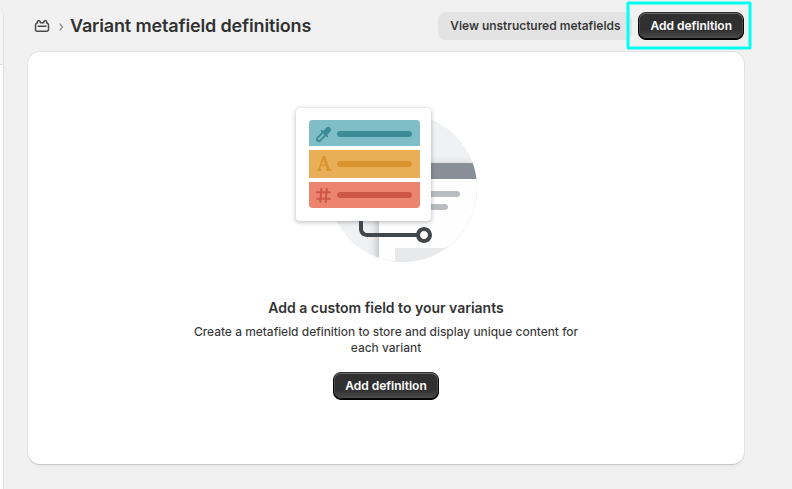
* **Value-level** description → click **Variants** → **Add definition**

<figure><img src="https://4026661835-files.gitbook.io/~/files/v0/b/gitbook-x-prod.appspot.com/o/spaces%2F50cmOdvfYj3qqQaTzKEI%2Fuploads%2Fgit-blob-9370686fae1ebe732bb931369f36eb3479a512a4%2Fimage.png?alt=media" alt=""><figcaption></figcaption></figure>
{% endstep %}

{% step %}

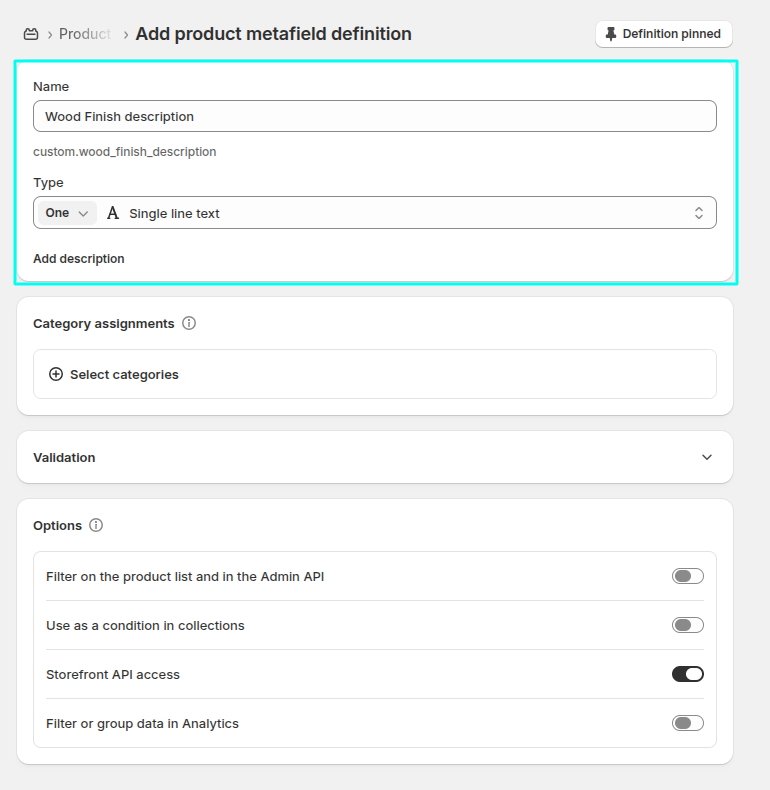
#### Name the definition and choose its type

Give it a clear **Name** (this is what you'll see in the app's picker, shown as `Name (namespace.key)`), then pick a **Content type**. Any type works — the display type just changes how it renders on the storefront:

* **Single line text** / **Multi-line text** → shown as plain text
* **File** (image) → shown as an image
* **File** (video) → shown as an inline video player
* **Dimension** → formatted as "value unit" (e.g. "42 cm")
* **Rating** → formatted as "value/scale" (e.g. "4/5")
* **Money** → formatted as "amount currency" (e.g. "12 USD")

<figure><img src="https://4026661835-files.gitbook.io/~/files/v0/b/gitbook-x-prod.appspot.com/o/spaces%2F50cmOdvfYj3qqQaTzKEI%2Fuploads%2Fgit-blob-1248948e53d25e9994fed8a6437a84a201583077%2Fimage.png?alt=media" alt=""><figcaption></figcaption></figure>
{% endstep %}

{% step %}

#### Save the definition

{% endstep %}

{% step %}

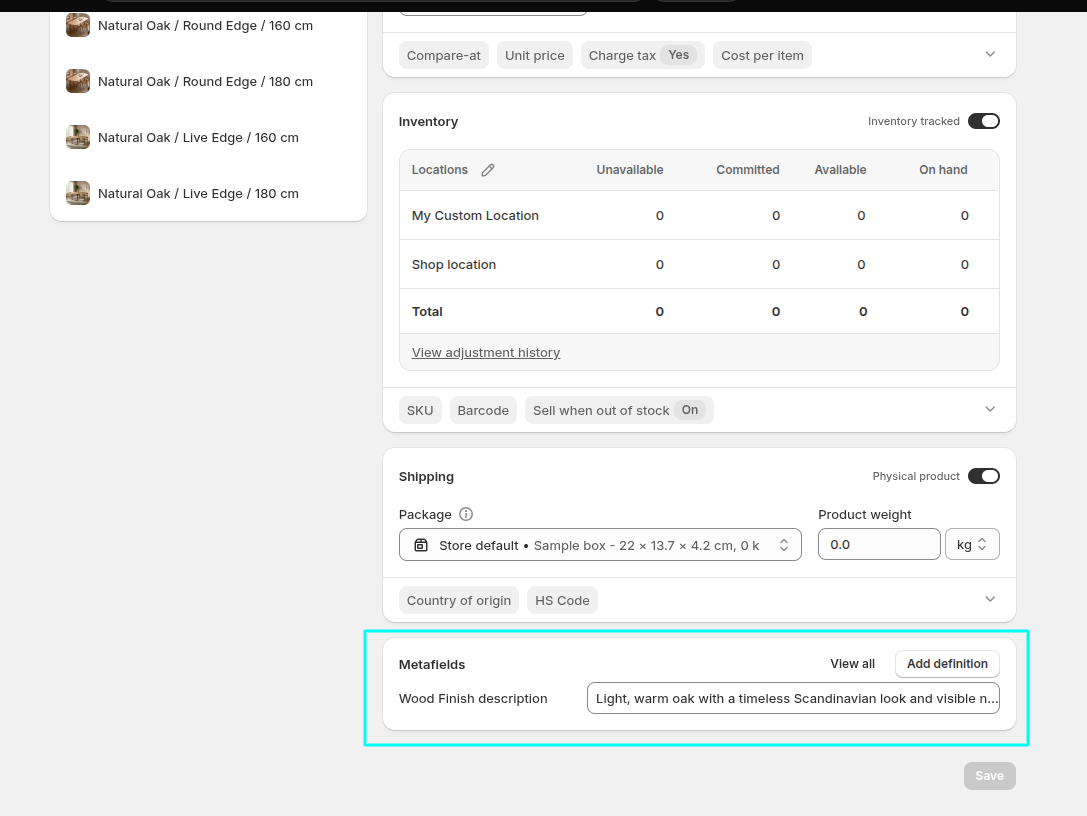
#### Fill in the value on each product

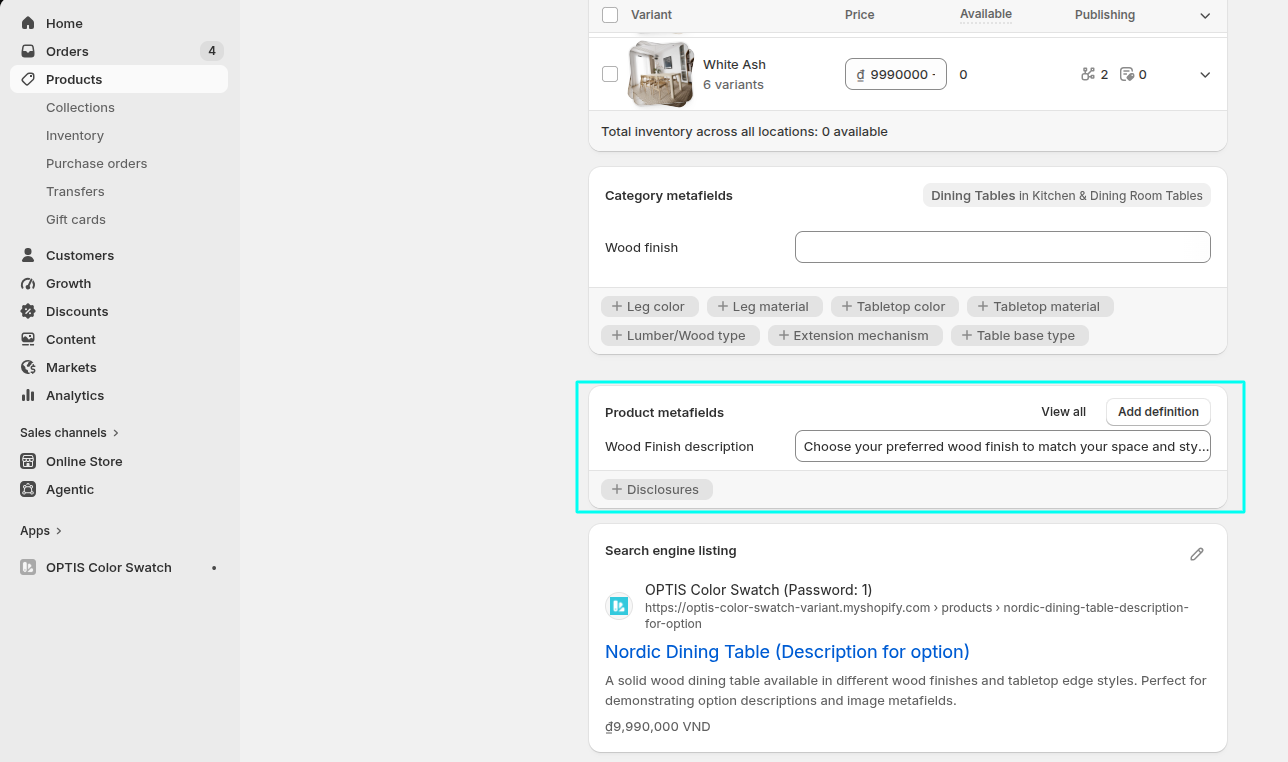
**Option-level**

1. On the Product page, scroll down to the Product metafields section.
2. Select the metafield created for Option description.
3. Enter the description for each option on that product. Repeat these steps for every product where you want to show option descriptions.

<figure><img src="https://4026661835-files.gitbook.io/~/files/v0/b/gitbook-x-prod.appspot.com/o/spaces%2F50cmOdvfYj3qqQaTzKEI%2Fuploads%2Fgit-blob-7bbbceff63f3bce1b44c30f6ded42e81403f1beb%2Fimage.png?alt=media" alt=""><figcaption></figcaption></figure>

**Value-level**

1. Open the product and click the variant you want to add a description for.
2. Scroll down to the Variant metafields section.
3. Select the Option Value Description metafield and enter the description for that variant value. Repeat these steps for each variant that needs a description.

<figure><img src="https://4026661835-files.gitbook.io/~/files/v0/b/gitbook-x-prod.appspot.com/o/spaces%2F50cmOdvfYj3qqQaTzKEI%2Fuploads%2Fgit-blob-1fd193057ef091344d00dd008ee29a3cb9490c04%2Fimage.png?alt=media" alt=""><figcaption></figcaption></figure>
{% endstep %}
{% endstepper %}

## Step 2: Turn it on in the app

{% stepper %}
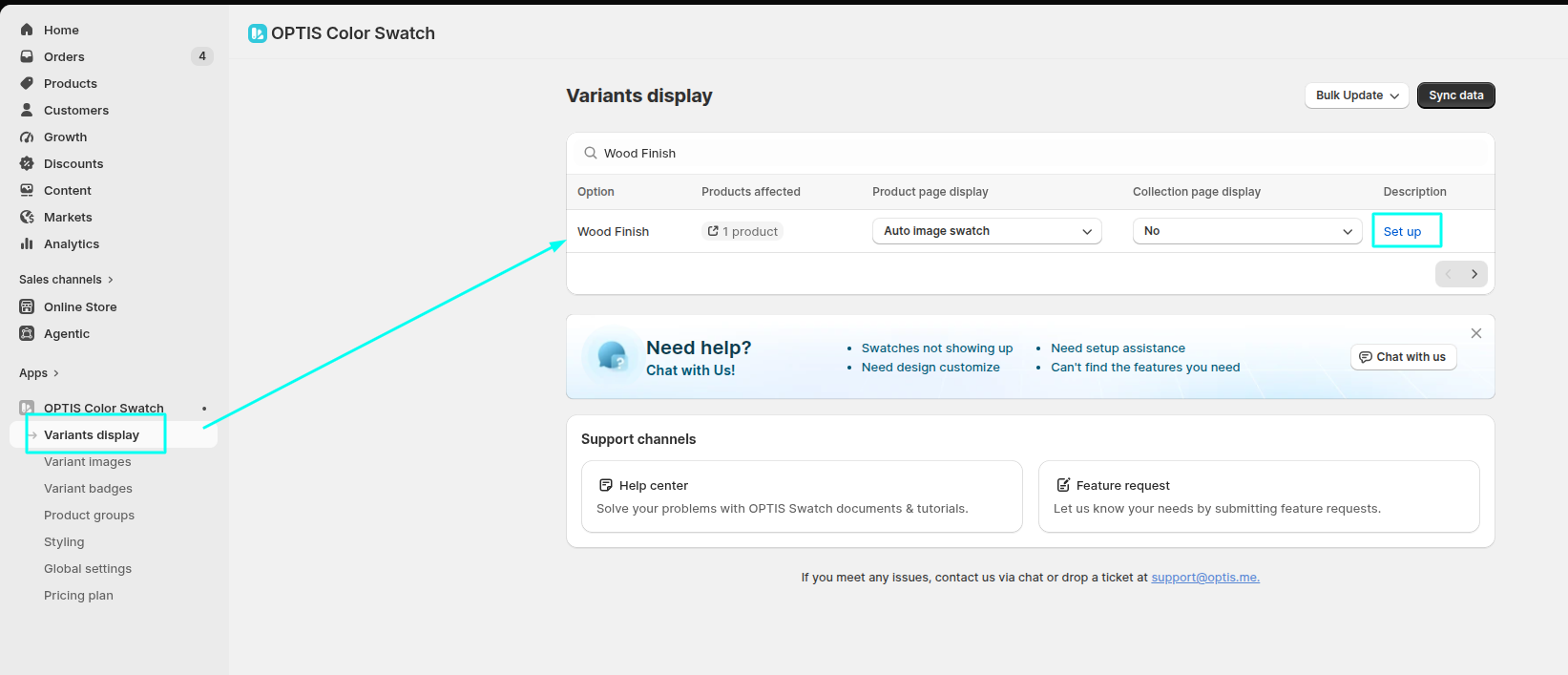
{% step %}

#### Go to Variant display → open **Description config** for an option

<figure><img src="https://4026661835-files.gitbook.io/~/files/v0/b/gitbook-x-prod.appspot.com/o/spaces%2F50cmOdvfYj3qqQaTzKEI%2Fuploads%2Fgit-blob-f235466129da001d115d961993351d1693ab1d61%2Fimage.png?alt=media" alt=""><figcaption></figcaption></figure>
{% endstep %}

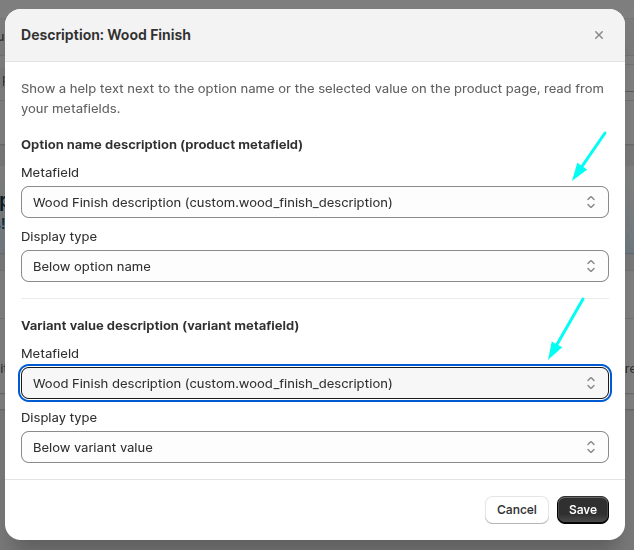
{% step %}

#### Turn on Option-level and/or Value-level descriptions

Pick the metafield you created — the **Option-level** dropdown lists your Product definitions, the **Value-level** dropdown lists your Variant (product variant) definitions.

<figure><img src="https://4026661835-files.gitbook.io/~/files/v0/b/gitbook-x-prod.appspot.com/o/spaces%2F50cmOdvfYj3qqQaTzKEI%2Fuploads%2Fgit-blob-acf71630c78762569b8322ef93164c79bd6fe388%2Fimage.png?alt=media" alt=""><figcaption></figcaption></figure>
{% endstep %}

{% step %}

#### Choose the display type

Below name, beside name, below option, tooltip, or popup.
{% endstep %}

{% step %}

#### Click **Save**

{% endstep %}
{% endstepper %}

{% hint style="info" %}
Added a new metafield in Shopify but don't see it in the dropdown? Refresh the Description config modal — it only lists definitions that already exist at the time it loads.
{% endhint %}