> For the complete documentation index, see [llms.txt](https://docs.optis.me/llms.txt). Markdown versions of documentation pages are available by appending `.md` to page URLs; this page is available as [Markdown](https://docs.optis.me/swatch/global-settings/non-existent-display.md).

# Non-existent display

Control how option combinations that **don't exist** appear to customers. A non-existent option is a combination that was **never created** as a variant for that product/parent — it has no SKU, no price, and does not show up in the variant list at all. This setting is in **Global settings** and applies to every product.

{% hint style="info" %}
This setting only affects option combinations that were never created. For variants that exist but currently have 0 available stock, see [Out-of-stock display](/swatch/global-settings/out-of-stock-display.md).
{% endhint %}

## Out-of-stock vs. non-existent

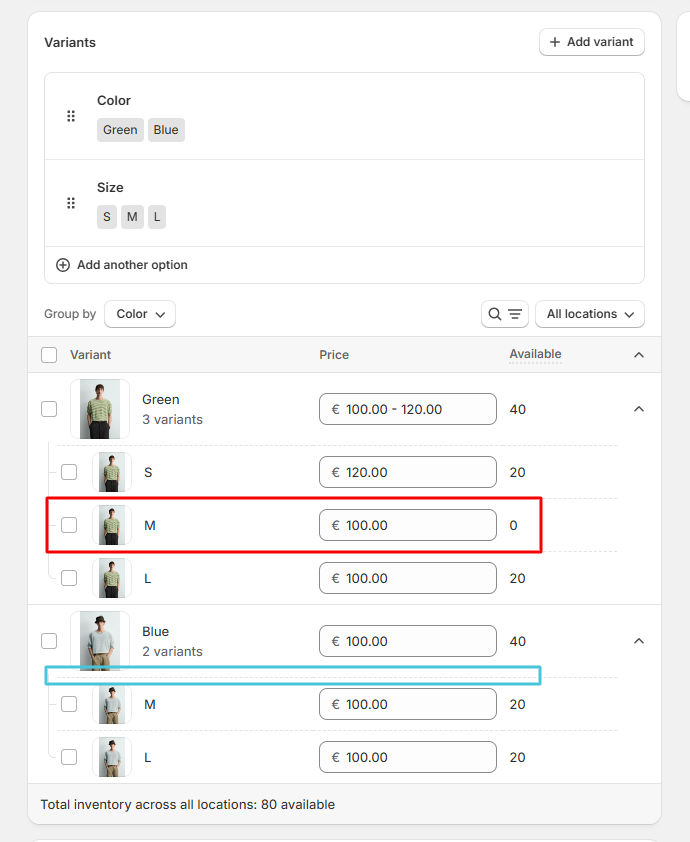
<table><thead><tr><th width="201"></th><th>Out-of-stock</th><th>Non-existent</th></tr></thead><tbody><tr><td><strong>Definition</strong></td><td>The variant exists (has a SKU/price) but available quantity is 0</td><td>The option combination was deleted</td></tr><tr><td><strong>Example (Screenshot below)</strong></td><td><em>Green / M</em> — listed among Blue's variants, Available: 0</td><td><em>Blue / S</em> — Blue's variant list only has M and L, so S was deleted</td></tr><tr><td><strong>Changes over time?</strong></td><td>Yes — restocking flips it back to available</td><td>No — stays fixed until you add a new variant with that combination</td></tr></tbody></table>

<figure><img src="/files/AFJScSTbX9DXrJqkTgww" alt=""><figcaption></figcaption></figure>

## Display styles

Choose one of four styles:

<table><thead><tr><th width="209">Style</th><th>What customers see</th></tr></thead><tbody><tr><td><strong>No change</strong></td><td>The option looks the same as any selectable one</td></tr><tr><td><strong>Strike-through</strong></td><td>A diagonal line is drawn across the option</td></tr><tr><td><strong>Gray out</strong></td><td>The option is dimmed/desaturated so it looks muted</td></tr><tr><td><strong>Hide</strong></td><td>The option is removed from the swatches entirely (default)</td></tr></tbody></table>

{% hint style="info" %}
**Hide** works well when you don't want shoppers to know a combination was never offered. **Strike-through** or **Gray out** keep the option visible so shoppers can see the full range of values (for example, every size) while understanding that this particular color simply doesn't come in that size.
{% endhint %}

Click **Save** to apply your changes.