> For the complete documentation index, see [llms.txt](https://docs.optis.me/llms.txt). Markdown versions of documentation pages are available by appending `.md` to page URLs; this page is available as [Markdown](https://docs.optis.me/swatch/global-settings/no-preselect.md).
# No preselect
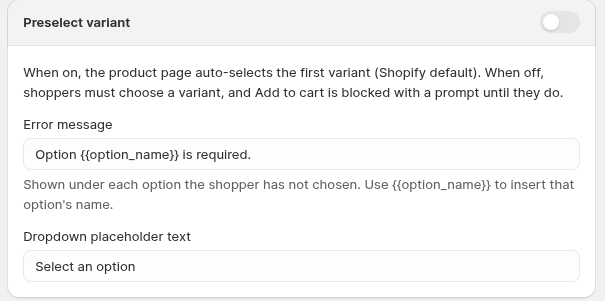
This setting in **Global settings** controls whether OPTIS automatically selects the first available variant option when a product loads.
## What it does
* When **On**, the product page auto-selects the first variant (Shopify default).
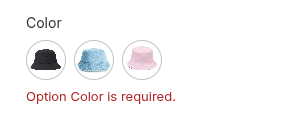
* When **Off**, shoppers must choose a variant, and Add to Cart is blocked with a prompt until they do.
* This setting applies globally to the product page, ensuring shoppers make an active choice before buying.
## How to use it
* Turn the toggle **Off** to prevent automatic selection and require explicit option selection.
* Use this when products have multiple option values and you want customers to confirm their choice.
## UI options
### Error message
Enter the text shown under each option the shopper has not chosen.
Use `{{option_name}}` to insert that option’s name.
Example: `Option {{option_name}} is required.`
### Dropdown placeholder text
Enter the placeholder shown in the dropdown when no option has been selected.
Example: `Select an option`
## When to use it
* Products with many variant options
* Stores that want shoppers to make a conscious choice before adding to cart
* Merchants who prefer a cleaner initial product view
Click **Save** after changing the setting.